Candor — encrypted journal, on-device AI, for iPhone
A Belvantis product · iPhone & iPad

A journal honest enough
to keep what you mean.

Candor for iOS is a private journal with a real AI on board — Apple MLX running Gemma and Llama on the Metal GPU, encrypted at rest with the iOS Secure Enclave, synced through your own iCloud. No server reads you. No model trains on you. Face ID is the key.

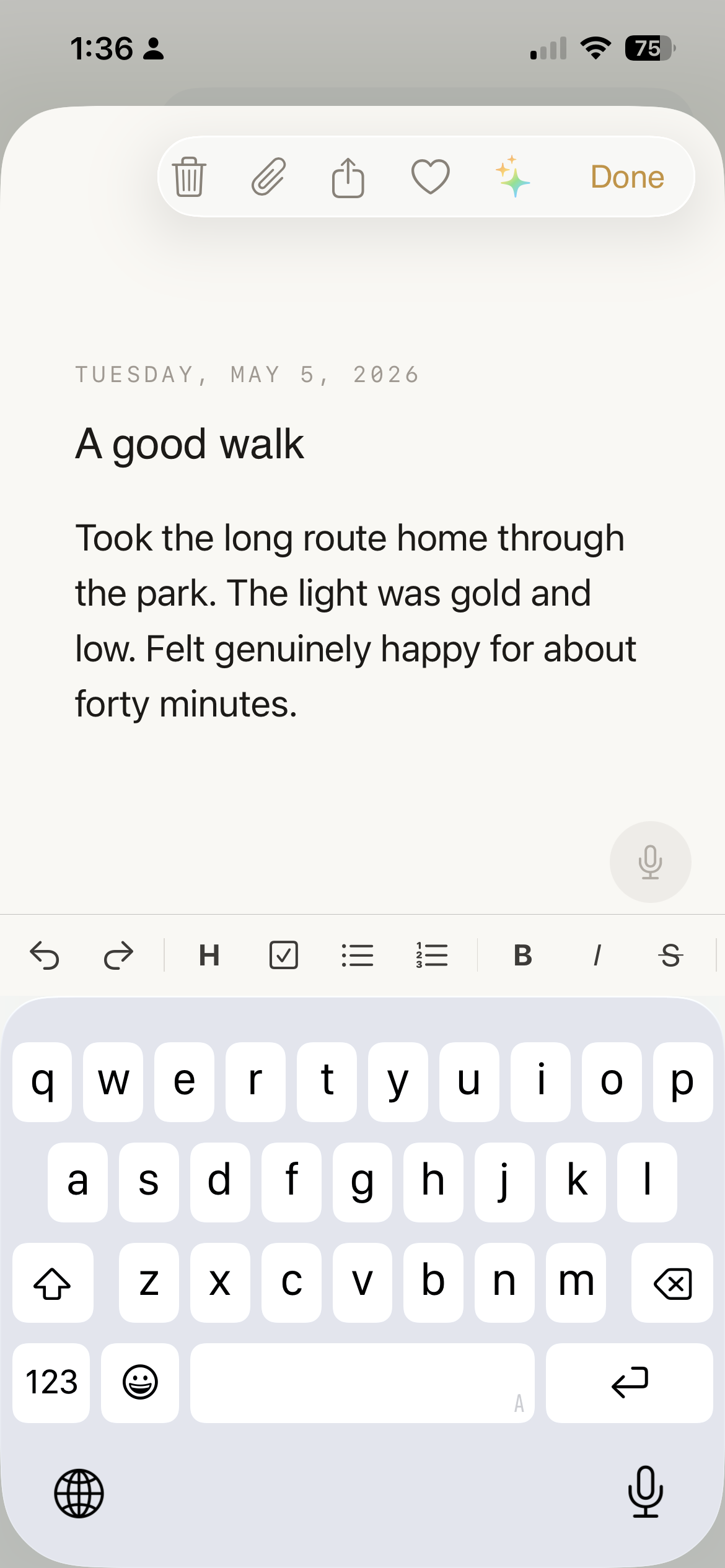
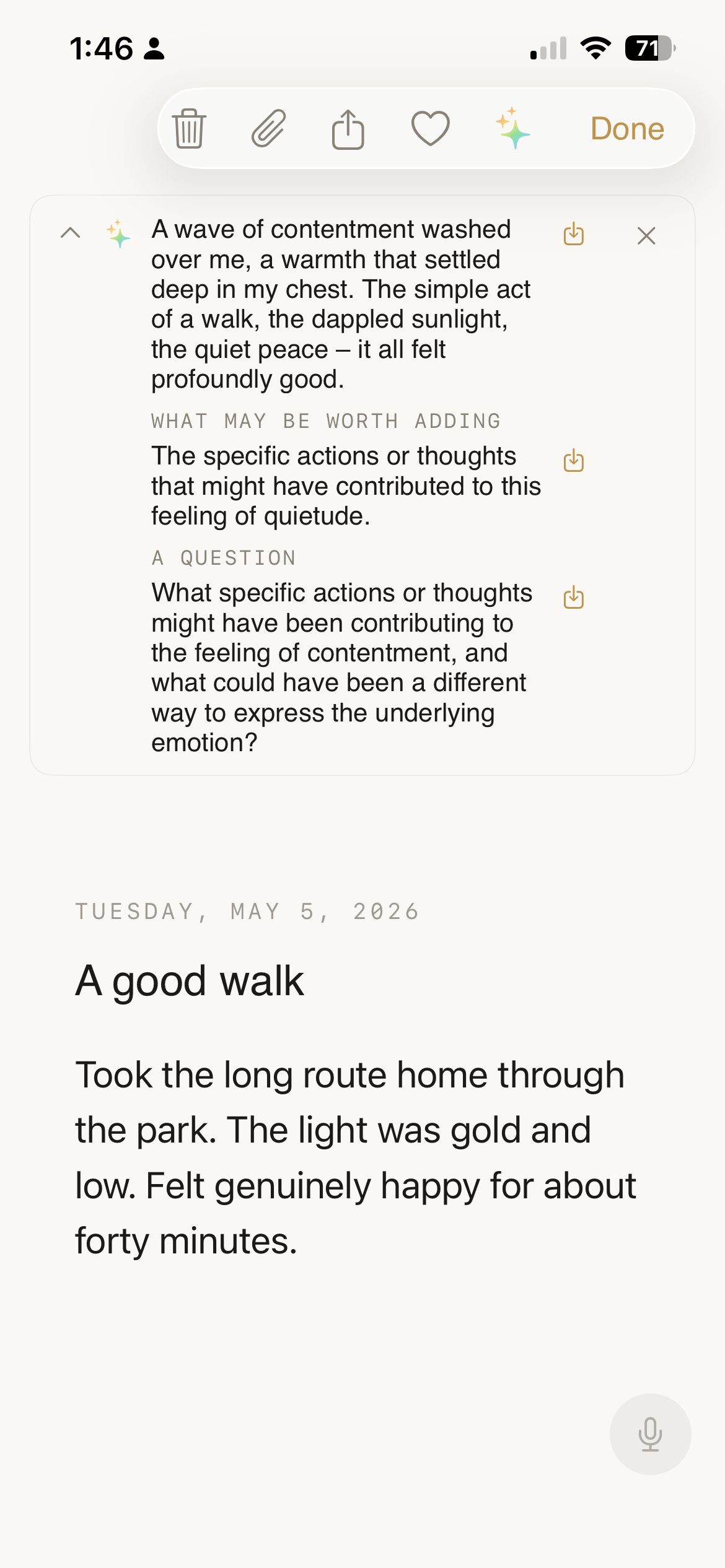
Candor's Write screen on iPhone — a calm, cream-colored note titled 'A good walk' in Georgia serif
Built on Apple MLX · XChaCha20-Poly1305 + Argon2id · Face ID + Secure Enclave · End-to-end CloudKit sync · $2.99 / month Pro
Why people stop journaling

You needed a place to write the things you don't say.

Notes apps sync to a vendor cloud you don't control. Mood-tracker apps sell aggregate trends to advertisers. AI chatbots train on whatever you paste in, and a year later the company is acquired by someone else. So you stopped writing the actual thing — and went back to writing the safe version, or nothing at all.

The problem was never the writing. The problem was that no app on your phone had earned the right to hold what you actually wanted to say.

What Candor for iOS is

Encrypted on your iPhone. Intelligent on your iPhone.

Every entry — typed, dictated, photographed — is sealed with XChaCha20-Poly1305 the moment it lands, using a key your passphrase derives via Argon2id. The encrypted blobs sync through your private iCloud database; we never see a row. The AI that helps you reflect runs on the device's Metal GPU through Apple's MLX framework, in airplane mode if you want.

Write honestly. Keep the intelligence anyway.

How it works

Three steps. Nothing leaves the device unencrypted.

Capture

Write in the app, dictate by voice, dictate from the lock-screen widget, share into Candor from any other app, or say "Hey Siri, add to Candor." Cold-start to first keystroke is gate-free — the AI never blocks you from typing.

Reflect

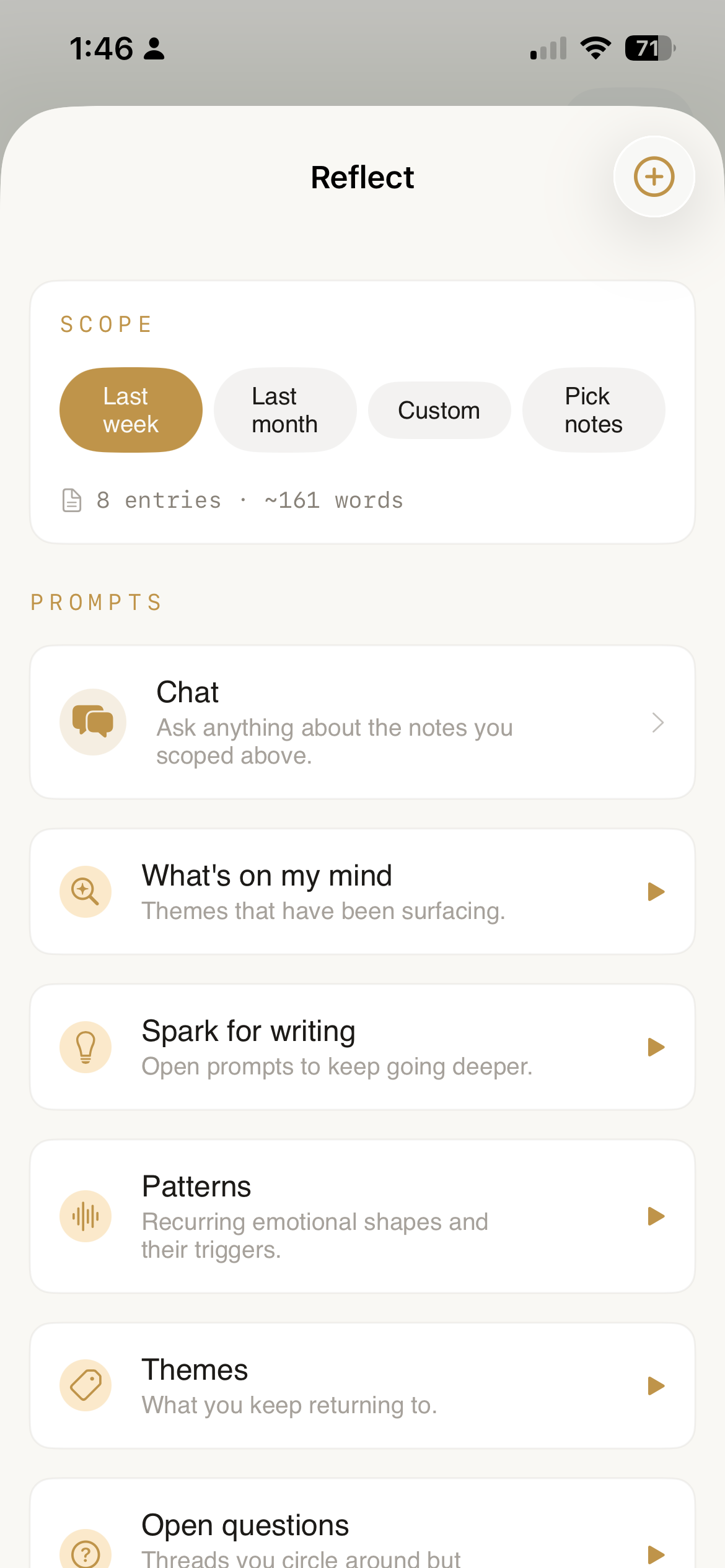
Open Reflect, scope to last week / last month / a custom range / a hand-picked set of notes, then tap a prompt: What's on my mind, Patterns, Open questions. The model runs on-device — useful in airplane mode, useful on the subway.

Keep

Encrypted CloudKit sync across your iPhone and iPad. Per-entry version history, autosave outbox, and a Sync Health screen that shows last error and lets you restore older revisions. Export to encrypted .ilbk or plain markdown whenever you choose.

See it

A calm place to think — that knows when to help.

Cormorant serif body. iOS-native toolbar. A floating gold pencil from the library. A bottom sheet with insights you can insert with one tap — and undo with one shake.

What makes Candor for iOS different

Five pillars, hardened for an iPhone you actually carry.

🔒

Sealed by the Secure Enclave.

Per-record XChaCha20-Poly1305. Argon2id (32 MiB / 3 iter) for password-derived keys. Master DEK held only in RAM, wiped the moment Candor backgrounds. Face ID gates re-entry. .completeFileProtection on every queued draft.

Apple MLX on the Metal GPU.

Pick your on-device model: Gemma 3 (1B / 4B / 12B), Llama 3.2 3B, or multimodal Gemma 4 E4B. Auto-recommended to your iPhone's RAM ceiling. Switching models is instant — no re-download. iCloud-storm aware so the model never battles a sync for memory.

🧠

Reflect, scoped to what you choose.

Twelve curated reflection prompts plus your own. Scope to last week, last month, a custom date range, or hand-picked notes. The model only sees what you scoped — and it runs on your phone, even with no signal.

Saves what you wrote, even when iOS doesn't.

1.5-second autosave. Background-task assertion holds during scene-phase transitions so encrypt + persist + iCloud export complete before the OS suspends. Per-entry 5-version history. A Sync Health screen surfaces failures the OS would otherwise hide.

🎙

Capture in one breath.

Lock-screen widget. Share extension from any app. Siri intent ("Add to Candor"). Custom URL scheme deep links (candor://write, candor://voice). All capture surfaces queue plaintext to an App Group inbox while locked, then drain into encrypted entries on next unlock.

An AI that respects undo

Insert with one tap. Reverse with one shake.

When the model offers a reflection or a question, tapping Insert doesn't mutate your text out from under you. The insert lands in UIKit's undo manager — shake-to-undo and the keyboard's undo arrow both reverse it. AI mutations to your own writing without one-tap reversibility erode the trust contract; we close that.

Writing your own entry, before AI
Your words first. The Spark icon in the toolbar is opt-in.
Spark reflection panel above the entry — Reflection, What may be worth adding, A question — each with an inline insert button
Reflection · what may be worth adding · a question. Each line has its own insert. Undo undoes.
Zero-tap capture, the iOS way

Five places you can write without opening the app.

Siri & Shortcuts

"Hey Siri, add to Candor" runs the AppendToCandor App Intent. The phrase is registered with the system, so it works from CarPlay and from your wrist. Locked Candor can't decrypt — so the intent enqueues plaintext, and your next foreground unlock turns each capture into its own encrypted entry.

Home / lock-screen widgets

Tap a widget to write a note instantly — even with Candor locked. The widget surfaces a tiny QuickCapture sheet that cannot touch the model context or the DEK; only Save and Cancel. Drained on unlock.

Share Extension

Highlight text in any app, hit Share, pick Candor. The extension writes to the same App Group inbox and sets the source on the entry. A 600-word article you saved from Safari becomes a journal entry with one tap.

Deep links

candor://write, candor://voice, candor://open. Wire them into Shortcuts, your launcher, or a personal automation. Voice deep link auto-starts the microphone after the unlock settles.

Voice journaling

Apple Speech for fast English transcription, sherpa-onnx Omnilingual ASR for fully offline multilingual notes. Everything stays on-device. Walk and talk on a hike with no signal — it still works.

Cold-start is gate-free

The Write surface never waits for the model to load. The AI is opt-in via the Spark button. Type the first character before the model is even asked to think.

Search you can actually trust

Three layers, in plain sight.

Your archive is only as useful as your ability to find a thing. Candor's search bar runs three layers in order — exact wins over fuzzy, fuzzy wins over none.

Temporal

"Last spring," "around June," "last week," "since the new year" — the parser strips the date phrase from the query and filters the result. No setup, no syntax.

Full-text (FTS)

Diacritic-folded, lowercased, prefix-expanded inverted index over body, title, mood, and category. Built off-thread; "anx" matches anxious; multi-word queries AND-intersect.

Semantic

Apple's NLEmbedding.sentenceEmbedding, 512-dim cosine similarity, language-aware. Vectors live only in memory and are purged the moment Candor locks. No model download, no third-party dependency.

Feature × why it matters on iPhone

Every iOS feature exists for one reason.

No surveillance trade-off, no half-measures.

iOS featureWhy you care
Apple MLX on the Metal GPUReal on-device intelligence, not a cloud round-trip dressed as one. Works in airplane mode.
User-selectable model (Gemma / Llama, 1B–12B)The 4B Gemma fits an 8 GB iPhone; Llama 3.2 3B is the safest small choice. Pick the one your phone can hold; switching is instant.
End-to-end encrypted iCloud sync (CloudKit private DB)iPhone and iPad share one encrypted vault. Apple stores ciphertext; we don't run a server at all.
Face ID / Touch ID + Secure EnclaveYour biometric is the key — not a UI gate over an unlocked database.
App Intents / Siri / Shortcuts"Hey Siri, add to Candor" — and one journaling intent later, your hands are free.
Lock-screen Widget ExtensionWrite without unlocking. The widget queues plaintext into an App Group inbox; your next unlock turns it into an encrypted entry.
Share ExtensionSend any selection from Safari, Mail, or Notes straight into Candor. Source stamped on the entry.
Apple Speech + Omnilingual ASRFast English transcription via Apple's built-in stack; Omnilingual sherpa-onnx 1B for fully offline multilingual journaling.
1.5-second autosave + background-task assertionCaps loss to half a sentence. iOS gives encrypt + persist + iCloud export time to land before suspend.
Per-entry 5-version historyCloudKit's last-write-wins still applies, but the loser is recoverable from Sync Health → Earlier versions.
Pending-draft outboxEncrypted ciphertext snapshots survive a crash. Recovered and merged on next launch.
Sync Health screenLast sync, last error, unflushed outbox count, every entry with stored versions. The first iOS journal that shows you the sync.
FTS + temporal + semantic searchFind "the night I called my sister" without remembering the date or the words. NLEmbedding stays in RAM and is purged on lock.
AI insert undo (UIKit undo manager)The AI never edits your text in a way one shake can't undo.
Encrypted .ilbk export & restore · ProCross-platform with the Android and web apps. One passphrase, one vault, three platforms.
Plain-markdown export, optional assets · ProDrop straight into Obsidian, Bear, or any markdown editor. Voice files and image attachments included if you toggle on.
Obsidian vault import · ProBring an existing Obsidian vault into Candor. Frontmatter, folder→category, filename-date heuristics handled.
.ilbk import (free)Reinstalling on a new iPhone? Your encrypted vault restores without the paywall — the recovery promise is non-negotiable.
Library-first UI modeBottom-bar-free layout. The library is the home screen. Floating gold pencil opens a fresh page.
Trust panel ("What's where")The single screen reviewers screenshot. Lists every place your data sits and what it's protected by.
Storage ManagerPer-category disk reclaim — voice, attachments, AI models, transcription models. Free a model you don't use without deleting an entry.
Who Candor for iOS is for

If you bought an iPhone partly for the privacy story, this fulfills it.

The Apple-ecosystem reflective

Notes, Reminders, Things, Day One — but you've outgrown the cloud trade-off. You want one encrypted vault that follows you between iPhone and iPad and never reads itself.

The privacy-first pro

Already on Signal, Proton, 1Password. Reads architecture pages before downloading anything. Pays for tools that earn it.

The Shortcuts power user

You wired your morning routine into a Shortcut and you want a journal that drops into it cleanly. Three App Intents and three deep links — done.

The traveler who flies

Voice entries on a plane with no Wi-Fi. The AI still works. Apple Speech transcribes; MLX runs the reflection on the Metal GPU at 30,000 ft.

The long-game journaler

You already have years of writing somewhere. Bring an Obsidian vault in, or a backup file from another tool, or just start fresh — and trust that you can leave with everything in plain markdown.

Pricing

The journal is free. Pro keeps the safety net running.

Every word you write, every on-device AI feature, every voice entry — free, on your iPhone, forever. Pro is a monthly subscription that unlocks the cross-device safety net: end-to-end encrypted iCloud sync, full-vault export, Obsidian import. Cancel anytime — your local archive keeps working.

Candor
Free · forever
The journal itself. Everything you do daily on a single device.
  • Unlimited local journaling
  • On-device AI (MLX + Gemma / Llama)
  • Reflect — 12 curated prompts + custom prompts
  • Spark in-line reflections (with undo)
  • Voice journaling — Apple Speech + Omnilingual ASR
  • Photos & multi-modal entries
  • Encrypted vault & Face ID lock
  • FTS + temporal + semantic search
  • App Intents, Widgets, Share Extension
  • Per-entry version history & outbox recovery
  • .ilbk import & ZIP import (recovery)
  • iCloud sync across devices
  • .ilbk export, markdown export
  • Obsidian vault import
Download free

Pricing shown is the U.S. list price. Apple sets local equivalents. Subscriptions auto-renew until cancelled in Settings → Apple ID → Subscriptions. Recovery imports — .ilbk and ZIP — stay free so a lapsed subscription never strands your archive.

Why choose Candor for iOS

The architecture is the product.

Most journaling apps add AI by adding a cloud call. Candor adds AI by running a model on your phone. The difference is structural, not marketing.

Built for the way you actually use your phone

Two ways to see your archive.

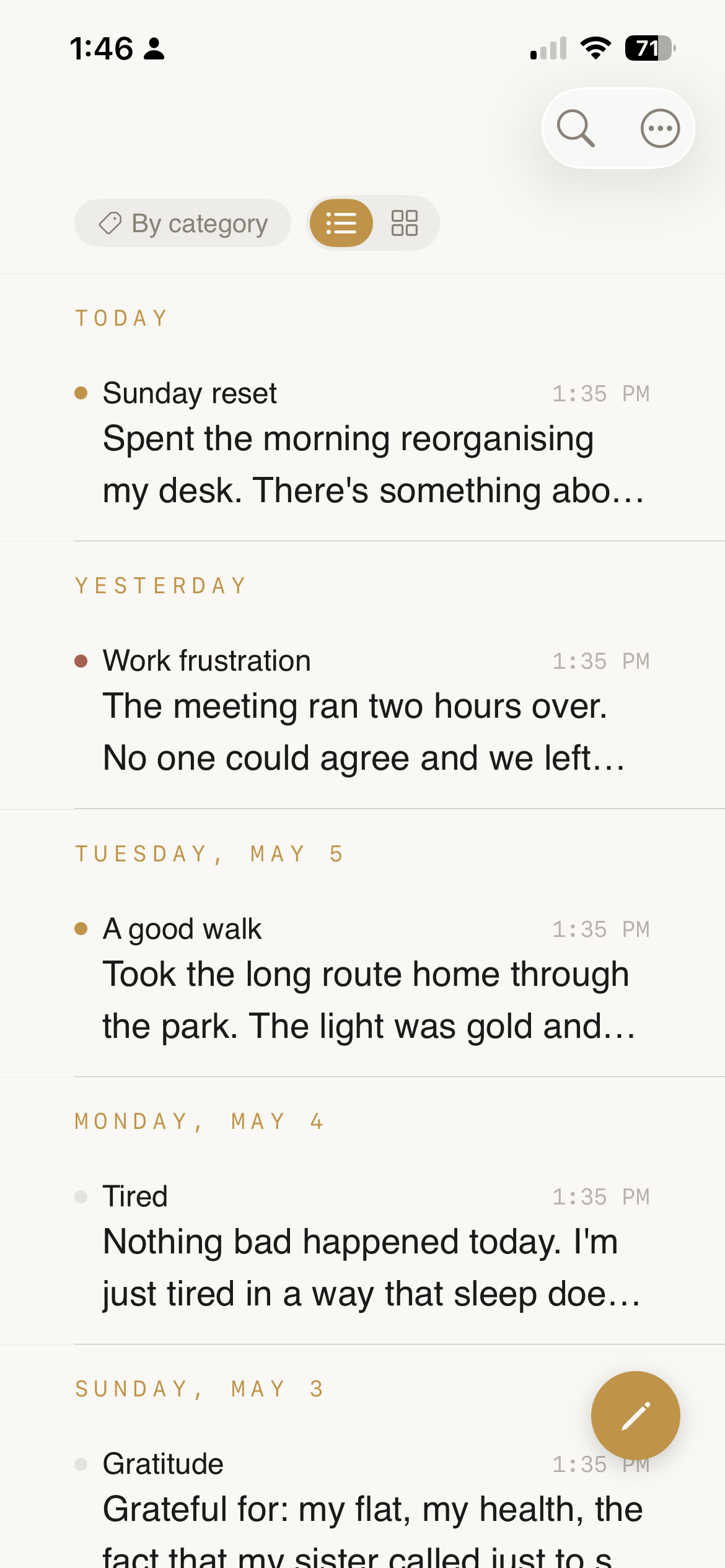
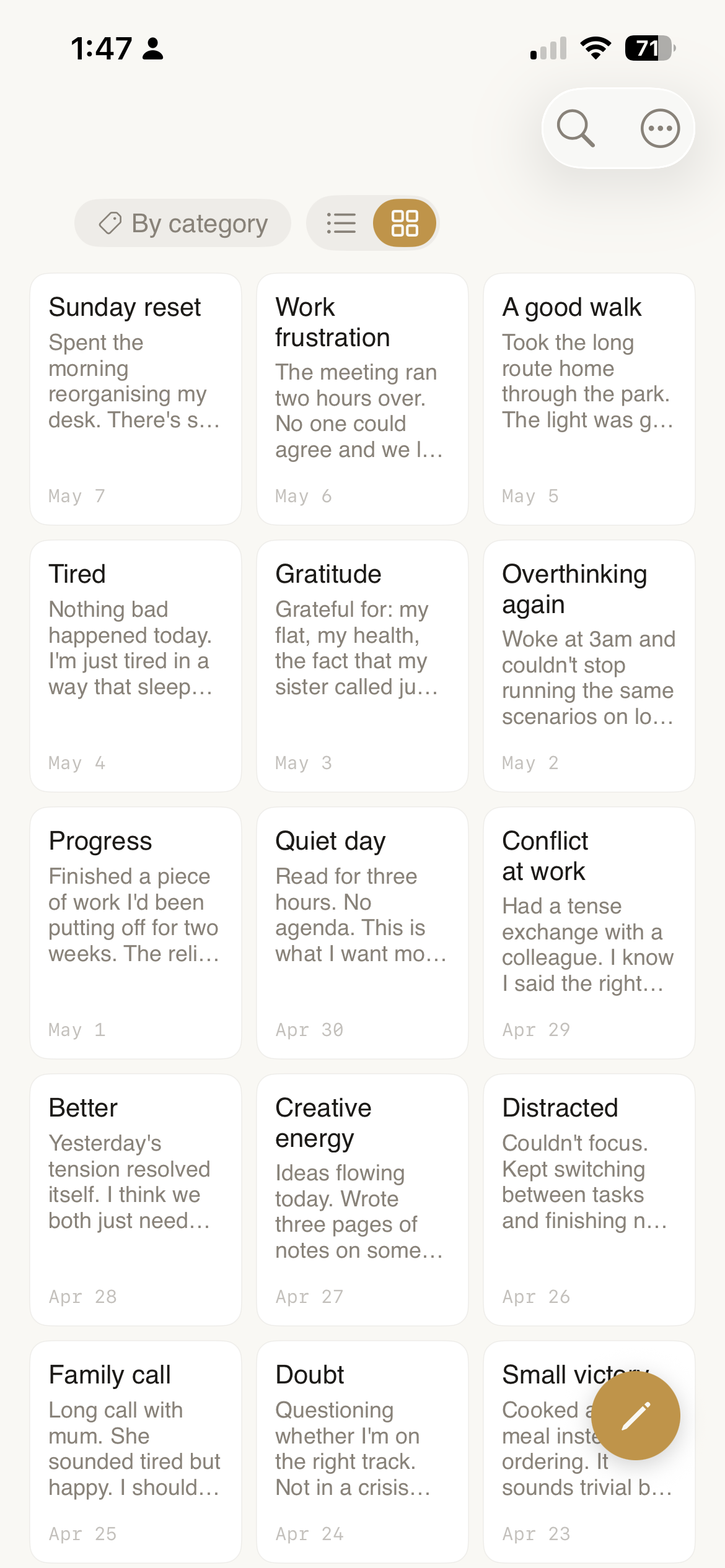
A chronological list when you want to scroll, a card grid when you want to scan. Mood dots in both, and the floating pencil opens a new page from anywhere.

Library list view — Today / Yesterday / Tuesday / Monday groupings
List · day-grouped, last-edited timestamps, mood-color dots
Library card grid — twelve note previews in a 3-column grid
Grid · scan a season at a glance, jump in by feel
FAQ

Honest questions deserve honest answers.

Can Belvantis read my journal?

No. Not technically, not with a warrant, not by accident. Your entries are encrypted on your device with a key derived from your passphrase via Argon2id, and held only in RAM while Candor is unlocked. iCloud holds ciphertext. We don't run a server. Even if we wanted to read your text, there's no path from where we sit to where it lives.

Where does the AI run?

On your iPhone or iPad, on the Metal GPU, through Apple's MLX framework. The default model is recommended to your device's RAM (Gemma 3 1B for 4–6 GB iPhones, Gemma 3 4B for 8 GB+); you can switch to Llama 3.2 3B or, on a Pro Max, the multimodal Gemma 4 E4B. Confirm it yourself by airplane-moding your phone — Reflect, Spark, and Buddy all keep working.

What if I lose my iPhone?

Sign into a new iPhone with the same Apple ID and your encrypted vault syncs back from iCloud automatically. Restore your Pro IAP from the App Store and unlock the same vault with your passphrase. Or, if you exported a .ilbk file, drop it into Onboarding's "Restore from .ilbk backup" path on a fresh install.

What if I forget my passphrase?

We can't recover it. That's the architecture working as designed. The only safe recovery path is exporting a .ilbk backup once and keeping the passphrase in a password manager. Set this up on day one — Settings → Privacy & Storage → Storage will warn you if you haven't.

How does Pro billing work?

Pro is an auto-renewing Apple subscription — $2.99/month or $24/year. Apple's StoreKit handles billing through your Apple ID; we never see your card. Manage or cancel anytime in Settings → Apple ID → Subscriptions. Family Sharing is supported on the yearly plan.

What happens if I cancel Pro?

Your local vault keeps working forever. Writing, on-device AI, voice journaling, search, version history — all free, all yours. The Pro features that pause are the cross-device and export surfaces: iCloud sync, .ilbk and markdown export, Obsidian import. Recovery imports always stay free, so a lapsed subscription never strands your archive.

What's free, and what's Pro?

Everything you do daily is free: writing, on-device AI, voice journaling, search, version history, App Intents, Widgets, Share Extension, FTS + semantic search, .ilbk import, ZIP import. Pro covers the cross-device and exit-ramp surfaces: iCloud sync, .ilbk and markdown export, Obsidian import. Recovery imports stay free so you can always restore on a new device.

Can I export my entries?

Yes — with Pro, into a markdown ZIP that imports cleanly into Obsidian, Bear, Logseq, or any markdown tool, or into an encrypted .ilbk file you can restore on iOS, Android, or web. We want the export to work; vendor lock-in is the opposite of trust.

What happens to my data if Belvantis disappears?

Your local vault keeps working. iCloud sync keeps working. The on-device model keeps working. You can export .ilbk or markdown anytime. The .ilbk format is documented in our cross-platform contract — even if no one maintained the app, your archive is portable.

Does the on-device AI know what I wrote last week?

Only when you scope it to. Reflect lets you pick "Last week," "Last month," a custom date range, or a hand-picked set of notes — and the model only sees the slice you scoped. There is no always-on RAG; there is no background indexing for the model. The semantic embedding index is purged the moment Candor locks.

Start writing the version you mean.

Free for the journal — unlimited entries, on-device AI, voice transcription, photos, search, version history. $2.99 / month for the safety net: end-to-end encrypted iCloud sync, full-vault export, Obsidian import.

Candor for iPhone & iPad is a private AI journal from Belvantis. Encrypted on your device. Intelligence on your device. Yours for life.